See your deals as a list, and on records
The Deals list shows your deals as a table that you can sort, filter and page through. It is the same deals as the board, laid out in rows. Employer, Contact and Opportunity records also show their own deals in a Deals panel. Everyone in your organisation can see them once Deals is switched on. See Track deals with employers on the Deals board.
Open the list
Go to Deals → List, or select List in the Board | List switch at the top of the board, beside Add deal.
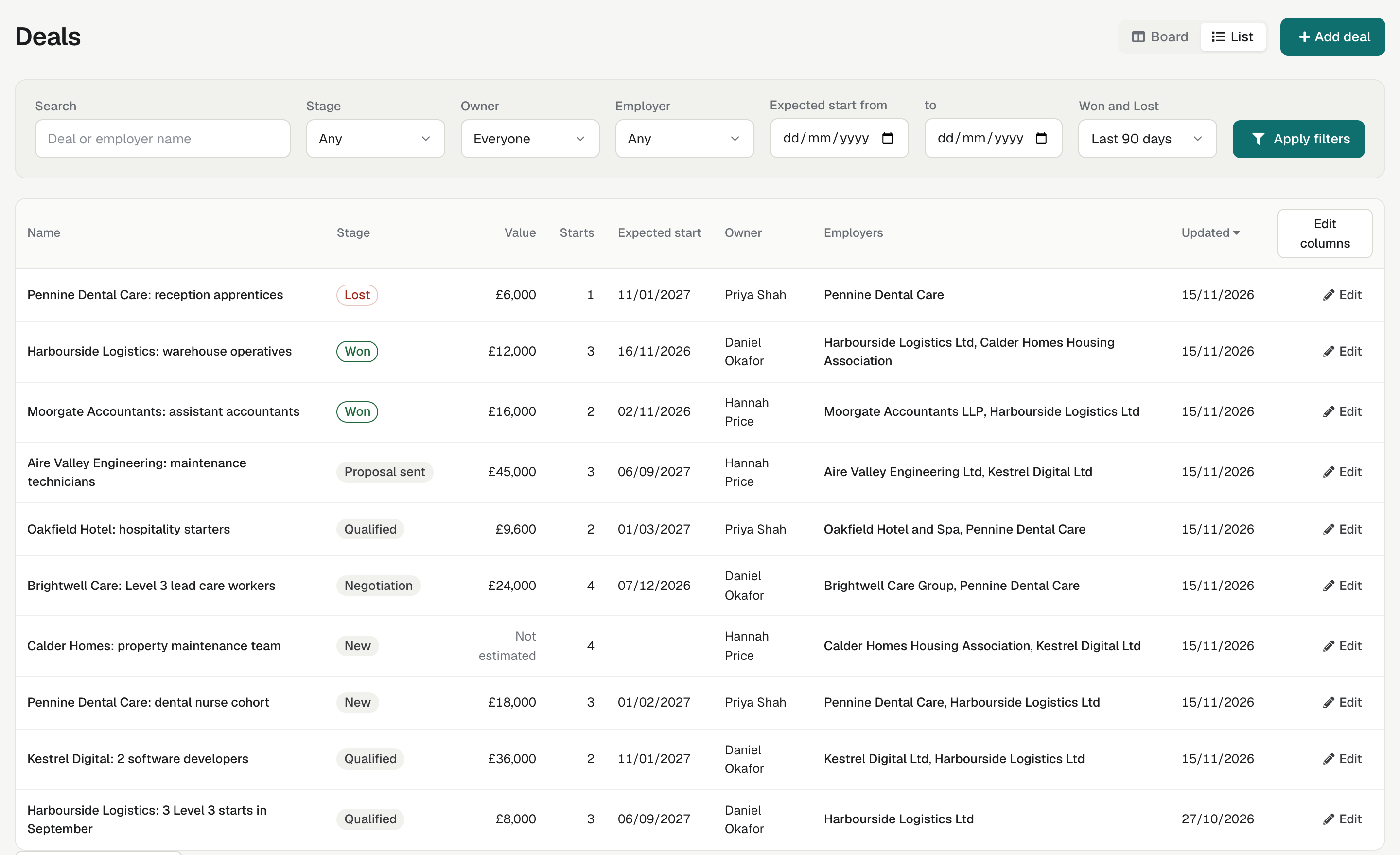
The list starts with the most recently updated deal first, 20 to a page. You can show 20, 50, 100 or 200 a page. Select a deal's name, or Edit, to open it. Read Only users see View instead.
Sort the list
Select a column heading to sort by it, and select it again to reverse the order. You can sort by Name, Stage, Value, Expected start and Updated. Value sorts highest first. Deals with no value, shown as Not estimated, stay at the end whichever way you sort, and so do deals with no expected start date.
Filter the list
The list has the board's filters (Search, Owner, Employer, Expected start from and to, Won and Lost) and one more, Stage, to show the deals in a single stage.
- Choose the filters you want.
- Select Apply filters. Nothing changes until you do.
Clear removes the filters and keeps your sort. If no deal matches, the list says "No deals match these filters."
Switching between Board and List keeps your filters. The board always shows every stage, but when you come back to the list it has the stage and sort you left it with.
On the board, a stage with more than 50 deals shows the 50 most recent and a link, for example Show all 64 in the list, which opens the list filtered to that stage.
Choose the columns
Select Edit columns to choose which columns show. Your choice is kept for you only, so colleagues keep their own. Users, Admins and Team Owners can edit columns; Read Only users see the standard ones.
| Shown at first | Can be added |
|---|---|
| Name, Stage, Value, Starts, Expected start, Owner, Employers, Updated | Contacts, Opportunities, Created, Closed |
Deals on Employer, Contact and Opportunity records
Once your organisation uses Deals, Employer, Contact and Opportunity records have a Deals panel. It lists the deals linked to that record, open deals first, then Won, then Lost, with each deal's Stage, Value, Starts, Expected start and Owner. Select a deal's name to open it. With no deals, the panel says "No deals yet."
Select Add deal in the panel to start a deal with that Employer, Contact or Opportunity already filled in. Read Only users don't see Add deal.
If you can't see the panel on an Employer or Opportunity, turn on Edit page layout and show Deals. See Show, hide and reorder panels.